Mostrando entradas con la etiqueta enviroment. Mostrar todas las entradas

jueves, 9 de diciembre de 2021

Japanese interior modular asset


So, we are getting into modular and procedural for making japanese scenes, for a nice price! You can check this asset, now available at the shop. Think that we give you support if you have problems to import the asset at your scene or loading the scene itself! 

https://assetstore.unity.com/packages/3d/environments/historic/modular-japanese-interior-pack-205887


martes, 20 de febrero de 2018

Sci-fi Interior Modular


At this point of developing 3D assets, We got the idea of making another extension of the Interior Modular, so we got the ideas of missing content into Modular Interior and included here the creation of terrace, upper windows, more indirect ligthning and the things you can see on the following pictures.


Modular:

How to bake a modular asset? You should take care of the division of the walls, when you have them already in position, sometimes you got some black shadows, you can see the seams between the objects, but how to solve it?

At the Unity automatic unwrap you can always make the walls bigger on the lightmaps by changing the Scale on the lightmap unwrap, and also prioritize lighting, make the space wider or smaller, depending on your needs.

The rounded corners are trickier, on those you should check if some object is colliding, so it does not interfere much on the situation you are having.

Don't get me wrong, I had to bake it and try until I get the good edition of each mesh thing on the scene. So it gets a bit of practice, but that's all, you will have the same results by clicking and checking on all the stuff wich is included on this package.

At the end you can get your own system of prefabs wich can give you results real fast.


viernes, 7 de abril de 2017

Cathedral 1.0.4


1.0.4 - Update with more windows. colored windows. And we still work on the prefabs and more upcoming assets!


https://www.assetstore.unity3d.com/#!/content/81894

So, what you can find into the asset is quite clear. You will receive like.. 45 or more prefabs (all with those pivots in place, you know? Because it's better to work this way)

With those prefabs, you can build any, and I mean ANY level you can imagine, so, the idea is to create some sort of blocks, wich are size of 1.. 2 units. And you even can place them by scripting. Like.. just moving and rotating pieces around, and them, you won't see the seams. Wich is kind of difficult, when you work on enviroment and small modules, right?

Under this text, you can see, one level.. then the camera view from the inside.


And then, some "messy" view of the level, wich is made out of those blocks, wich you can place, select and do whatever you want. but from the inside would be like the image under it.


The "difficult" part would be the illumination, wich is not difficult at all.
You have indirect illumination, wich comes from emmisive cubes, those emmisive cubes can be hidden after baking the scene. (It is the most recommended way to illuminate a level)

Then, you will need to place some Reflection Probes, so.. you can see the white/color reflection at the floor on the image above. Also, keep in mind, if you use Deferred lighting, you can blend the reflection from different probes, is how we get the result you see.

And.. finally, to make the moving characters in the scene, or moving pieces (wich can be just the doors) you need to bake the Light probes, wich those.. tell you if a character gets illumination between probes, more light or less light from this space. And those need to be placed all over the place, where the character can move. (No need on the ceiling.. unless it can fly around or jump quite high)

If you are using smartphone end.. then, you want to use illumination less expensive, probably get to rendering path: Forward. Wich does not allow to blend the reflection probes (as one of the multiple things you cannot do)

Best recommendation to make the light of the scene

Keep it simple!

Start from the beginning. If you don't know what is going on on the light of the scene, then.. hide or deactivate things. Light sources.. wich are also reflection probes.

Now is a bit simple to see that on Unity 5.6 But.. you know? It got messy when they changed the names inside, and then you have to differenciate between light engine, lighning path, now the way of shadowing... My advice, is to get comfortable with the basic stuff, then try to add another thing. And try not to add something you don't know what is doing at the scene, this means, learn how to use it, if you want to use it, probably you won't apply it properly and make the scene go slower. That means.. study! And.. simplify

Color path? I don't know why they put the option.. they recommend to use the default one to get more public. It is hard to learn something when the people just throw the things inside and tell you to use it, without knowing what is going to happen at the mobile of.. who knows, mixed with.. another thing wich is new as well... Keep it simple, then, you will start to learn!

miércoles, 15 de marzo de 2017

Modular Cathedral


Finally! We got to release the Modular Cathedral, the perfect enviroment for the Medieval Angel, so, we decided to make little modules to make possible different schedules.

Our inspiration? The classics and the new.

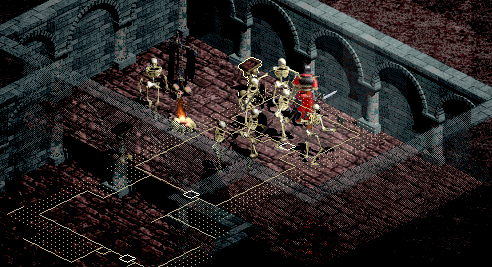
We remember when we first tried Diablo, and then the second Diablo game, those from Blizzard franchise, 3D was rendered with isometric modules, and those were programmed for being generated the "procedural way", so you were able to reach different enviroments, just by starting a new game, each time you played, you had to find the doors, find the monsters. Small modules on the game had the same structure, but you get the idea.


This way, I thought about making cathedral level, so you could get some sort of Diablo and my new favourite: Dark souls themed, wouldn't it be great to have procedural way to generate cathedrals and dungeons, with the system of play from Dark Souls? So, that was my inspiration to make this level design.

Features:

A building using the pieces I created for Modular Cathedral, wich is resembling an empty cathedral, where you can place everything you need on your game, you can use this part on your game without a problem, just we are working hard on the module part, so you can generate quite everything similar to this cathedral structure.


The modular built in:

So, we try to make the most sense on the modules/prefabs we are creating on this asset, so, soon you can see an structure like this one, wich will be in different pieces. So, this one will be pieced into 9 different prefabs, but also those parts could be with different variations, one just being a big wall, or with a big door, medium door, small door... And then, we can create corridors, bigger, wider structures, at the moment I am trying to make the first floor, and then I will continue making prefabs for wider, taller roofs. This takes a bit of time.. I will explain it in other post about pivot nightmares.


jueves, 26 de enero de 2017

New images, cathedral and angel

So, basically, we upgraded the asset from Angel pack with some key pics with more resolution and better looking.


But, we have been working on the upcoming asset wich is going to be a modular way to produce cathedral looking levels, wich are inspired into the saga Dark Souls, wich I believe is one of your favourite as well.

We wanted to reproduce the way it looks, but also make it possible to use for smartphone app developers, who are also concerned about the low-poly and fast shader configuration, these images are Directx result though.

So, it comes with slow flow, but it comes steady, till Sushi shop gets it's first steps on the Unity Asset Store. We hope, lots of indie game companies likes it, because enviroment is one of the tough beast you have to control, and is quite expensive to produce them. But we like to make both, chars and enviro. We hope we can get some of your feedback and we are pleased when you enjoy our work!